What do you need to make a photo talk?
- One clear photo. A face looking at the camera, in good light, with the mouth easy to see. Head and shoulders works best. A cartoon character's face works too.
- The words. Either type a script (up to 1,000 characters, about a minute of speech) and pick one of our 17 voices, or upload a voice recording (mp3, wav or m4a).
- Permission. It must be your own face, a character you made, or someone who said yes. More on this below.
The finished video can be up to 60 seconds long.
How do you make a photo talk, step by step?
- Open the Lip sync studio and sign in with Google.
- Pick a model. Not sure which? Start with HeyGen Avatar 6 Turbo, the cheapest one (see the table below).
- Upload your photo.
- Choose Type a script, write your words and pick a voice. Or stay on Upload audio and add your own recording.
- Tick the box to confirm the face is you, or that you have the person's permission. We ask every time.
- Click Generate. The price shows on the button first. Most videos are ready in a few minutes and are saved in your Library, where you can download them as MP4.
Which AI is best for talking photos?
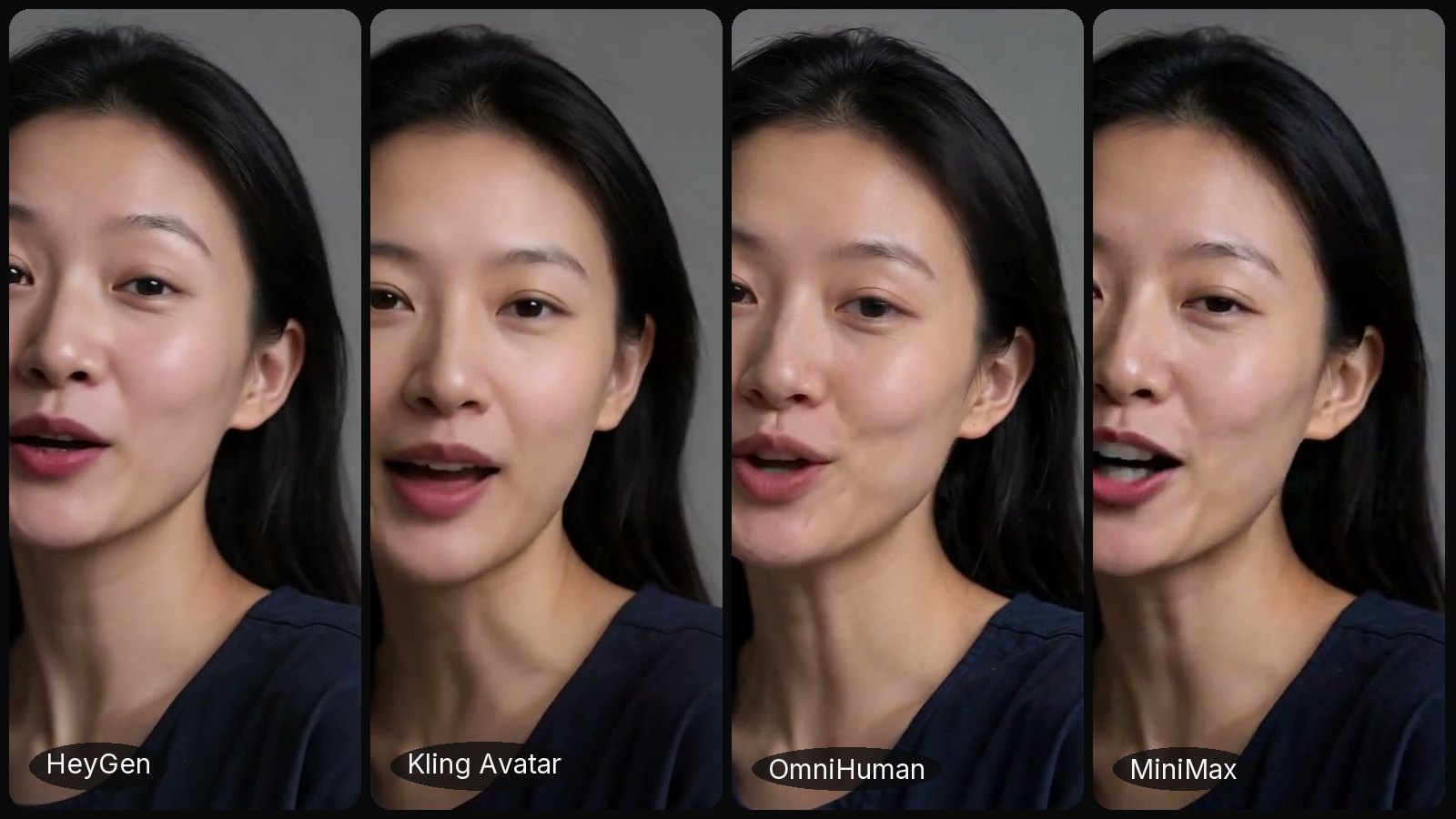
We gave all four models the same AI-made portrait and the same line of text. She is not a real person: we made her with Seedream 5.5.
Calm and natural, like a presenter.
Simple lip sync. No extra settings.
| Model | Best for | 10 s of speech | Plan |
|---|---|---|---|
| HeyGen Avatar 6 Turbo | Presenter-style videos; you can describe the movement | 110 credits ($1.10) | Every plan |
| Kling Avatar 2 Pro | Lively faces, cartoons | 253 credits ($2.53) | Pro and up |
| OmniHuman 2 | Whole-body movement while talking | 231 credits ($2.31) | Pro and up |
| MiniMax H3 Lip Sync | Simple lip sync on a still photo | 176 credits ($1.76) | Every plan |
The models come from HeyGen, Kuaishou (Kling), ByteDance (OmniHuman) and MiniMax. You pay per second of speech, so a 30-second video costs three times the 10-second price.
How do you make the lip sync look natural?
The photo
- Face the camera straight on, or nearly. Side views lip sync badly.
- Keep hands, hair and microphones away from the mouth.
- Use a sharp photo. If yours is small or blurry, run it through the upscaler first.
- A calm, plain background keeps attention on the face.
The words
- Write the way people talk: short sentences, simple words.
- Commas and full stops become small pauses, so use them.
- For social media, 15 to 30 seconds is plenty.
- If you upload a recording, use a quiet room and no background music. Add music after.
Whose photos are you allowed to use?
A talking photo can make anyone appear to say anything. That is why we have one firm rule: use your own face, a character you made, or a real person who has given you permission. Never use it to make someone seem to say something they did not say.
Fake videos of real people made without their permission can break the law in many places, including several US states, and they break our Terms. When you post, use the platform's AI label. Instagram, TikTok and YouTube all have one.
Other common questions
Does it work on cartoons?
Yes, as long as the character has a clear face and mouth. Kling Avatar 2 Pro is made to work on cartoons too.
Can I use my own voice?
Yes. Choose Upload audio and add a recording of up to 60 seconds.
Can I use the video for my business?
Yes, following our Terms and each model's rules, and only with faces you are allowed to use.
What if it fails?
You get your credits back automatically.